


A standard 3D print can take anywhere from 30 minutes to several days, depending on its size, complexity, and printer settings. Most small toys and gadgets finish within 2 to 6 hours, while larger, highly detailed models will require 24 hours or longer. By adjusting settings like layer height and infill, you can easily speed up or slow down this process.
Imagine you have a great idea for a new tool or toy. You sit down, design it on your computer, and send it to your new 3D printer. You expect to see your creation appear in a flash. Instead, the machine starts to move slowly, hum, and take its time. It is a common moment for everyone new to this hobby. You find yourself watching the nozzle move back and forth, wondering about the clock.
The world of making things at home is exciting, but it requires some patience. Many people ask, “How long does it take to 3D print something?” when they first start. The answer is not a single number. It is a puzzle with many moving parts. Each choice you make before you press the start button will change the clock. Some prints are done before you finish lunch. Others will run all night and into the next day.
In this guide, we will break down the process step by step. We will look at why some prints take minutes while others take days. You will learn about printer settings, materials, and sizes. We will also share some easy tricks to speed up your machine. By the end, you will know exactly how to plan your projects and save valuable hours.
Key Takeaways
- Size and Volume: Bigger objects require more material and layers, which directly increases print times.
- Infill Density: A higher infill percentage makes a part stronger but adds hours to the overall print time.
- Layer Height: Thicker layers speed up printing but result in a rougher surface finish.
- Printer Type: FDM printers are generally faster for simple shapes, while resin printers offer incredible detail but take longer.
- Speed Settings: Adjusting print speed in your slicer software can save time, but going too fast may cause print failures.
Quick Answers to Common Questions
Why does 3D printing take so long?
3D printing takes time because the machine must build objects layer by layer using a thin nozzle. Each thin layer of melted plastic must cool and bond before the next layer can be added.
Can you speed up a 3D print while it is printing?
Yes, most 3D printers allow you to manually adjust the speed percentage on the display screen while a print is running. However, raising the speed too much during a print can cause nozzle clogs or layer shifting.
Does infill density affect print time?
Yes, infill density has a huge impact on print speed. Lowering your infill from 100% to 15% can often cut your print time in half by reducing the amount of internal plastic the printer has to lay down.
Why does resin printing feel faster than FDM printing?
Resin printing is faster for multiple items because it cures an entire layer of liquid resin at once using a UV light screen. This means printing ten items takes the same amount of time as printing just one.
Does a larger nozzle speed up printing?
Yes, swapping to a larger nozzle like a 0.6mm or 0.8mm allows the printer to lay down wider and thicker layers. This reduces the number of passes the nozzle has to make, cutting total print times significantly.
📑 Table of Contents
The Core Elements: What Dictates 3D Printing Speed?
To fully answer how long does it take to 3D print something, we must look at the key elements that affect speed. When you start a print, the machine must build your object layer by layer. This is why time can vary so much. Several key factors control this pace. If you want to understand how long is the process for 3D printing, you must first look at the design details.
Object Size and Volume
This is the most obvious factor. A tiny plastic ring uses very little plastic. The printer can finish it in ten minutes. A large cosplay helmet uses a huge amount of plastic. The nozzle must travel across the bed thousands of times. If you double the size of an object, you do not just double the print time. You often make it take eight times longer. This happens because volume grows in three dimensions, not just one.
Layer Height and Resolution
Think of layer height like the thickness of steps on a staircase. If the steps are very small, you need many of them to reach the top. This makes the staircase smooth, but it takes longer to build. In 3D printing, thin layers make your object look smooth and detailed. However, the nozzle must draw more layers. Thick layers look rougher, but they finish much faster. If you choose a thick layer, you can cut your print time in half.
Internal Structure: Infill Density and Patterns
Most 3D prints are not solid plastic. If they were, they would be very heavy, costly, and slow to make. Instead, printers fill the inside with a grid or mesh. This internal structure is called infill. You can adjust this setting in your software to control both strength and speed.
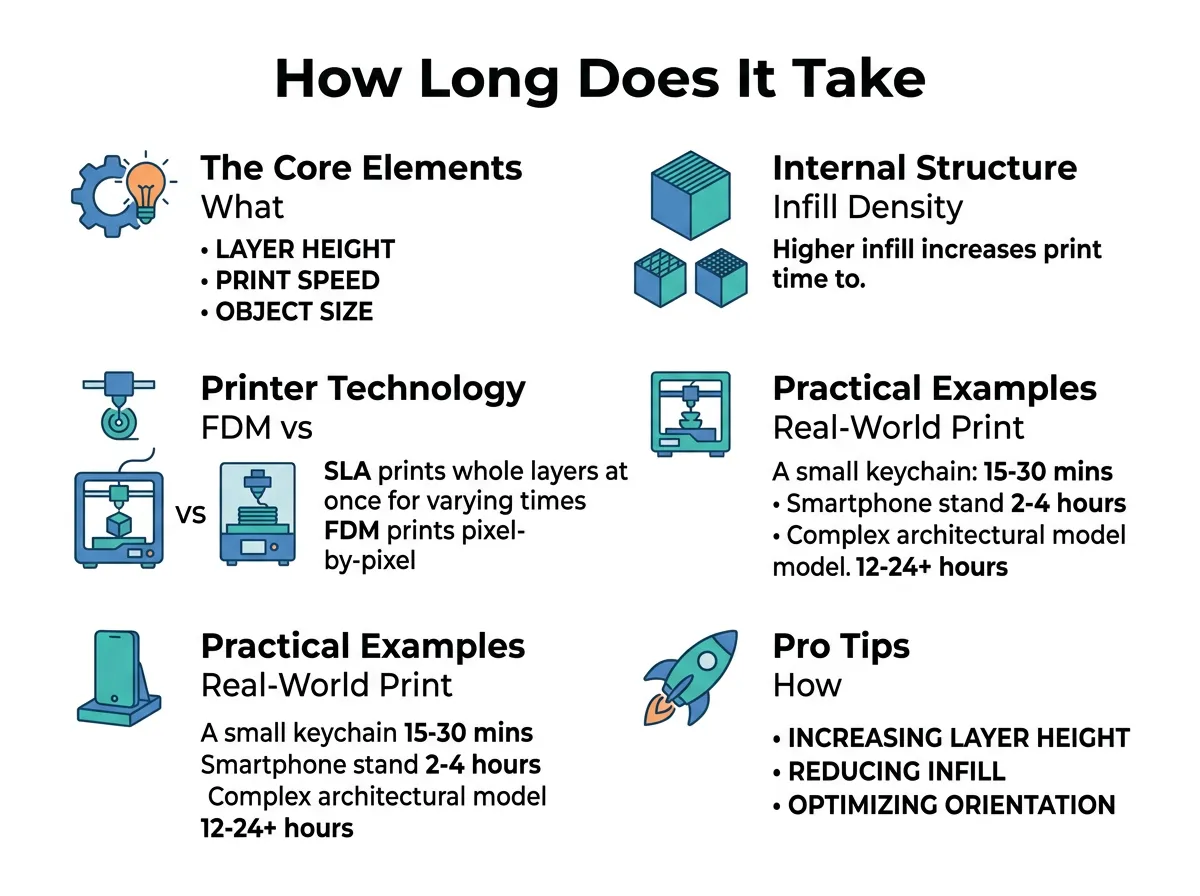
How Long Does It Take to 3D Print Something? — key points at a glance
Choosing the Right Infill Percentage
Infill percentage means how much of the inside is solid plastic. A 100% infill means the part is completely solid. A 0% infill means the part is totally hollow. For most decorative items, a 10% to 15% infill is plenty. If you need a strong part, you might use 30% to 50%. Higher infill percentages mean the printer has to fill more space. This adds a lot of time to your project. Keeping your infill low is one of the best ways to finish a print fast.
Structural Patterns vs. Fast Patterns
The printer does not just fill the space randomly. It uses geometric patterns. Some patterns, like grid or triangles, are very strong but take longer to print. Other patterns, like gyroid or lightning, are designed to be fast or use less plastic. Choosing the right pattern can shave hours off a long project without losing strength. It is a simple setting in your slicer that makes a big difference.
Printer Technology: FDM vs. Resin Systems
Not all 3D printers work the same way. The type of machine you use will change how you think about time. The two most common types are Filament (FDM) and Resin (SLA or MSLA) printers. Each has a different approach to building parts.
Filament (FDM) Printers
FDM printers melt plastic filament and draw each layer with a nozzle. The nozzle must visit every single spot on the layer. If you put five different items on the print bed, the nozzle must draw all five. This means printing five items takes five times longer than printing one. FDM is great for large parts and functional tools. You can learn more about these factors in this guide on how long does 3d printing take across various systems.
Resin (SLA/MSLA) Printers
Resin printers use a light screen to cure liquid resin. Instead of drawing lines, the screen flashes a whole layer at once. This means the speed depends only on the height of the object. It does not matter if you print one tiny miniature or ten of them. As long as they are the same height, they will finish at the exact same time. Resin printing is very fast for batches of small, highly detailed items. However, the cleanup and curing steps after printing add more tasks to your day.
Practical Examples: Real-World Print Times
When asking how long does it take to 3D print something, it helps to look at real-world objects. To help you plan, let us look at some common items. These examples assume you are using a standard FDM printer with average settings. These times are good estimates for daily projects.
Small Toys and Miniatures
If you want to print a small toy, like a little plastic cat, it will take about 1 to 2 hours. A standard chess piece will take around 45 minutes. These objects are small, so the printer can finish them quickly. They do not need much infill, which helps keep the speed high.
Phone Cases and Practical Items
A simple phone case is flat and thin. It usually takes about 2 to 3 hours. A plastic bracket for a shelf might take 3 to 5 hours. These items need to be strong, so you will use more infill and thicker walls. This extra plastic adds a little time but ensures the part does not break.
Large and Complex Projects
What about big items? A full cosplay mask or helmet can easily take 24 to 48 hours of continuous printing. A large vase with complex designs might take 12 to 18 hours. For these big jobs, you must make sure your printer is reliable. A failure after 20 hours of printing can be very frustrating.
Pro Tips: How to Speed Up Your 3D Prints
If you are tired of waiting, you can make your printer run faster. You do not need to buy a new machine to save time. Here are some simple tips to speed up your work. Many users ask how long does it take to 3d print something when using optimized settings, and the answer is often much faster than you think.
Swap to a Larger Nozzle
Most printers come with a 0.4mm nozzle. This is great for detail, but it is slow. If you swap to a 0.6mm or 0.8mm nozzle, you can print much thicker walls. This allows you to cut your print times by 30% to 50%. It is the best upgrade for large, structural parts that do not need tiny details.
Optimize Your Slicer Settings
Your slicer software has a huge impact on speed. You can increase the print speed setting from 50 mm/s to 60 or 80 mm/s if your printer can handle it. You can also reduce the number of wall loops. Two walls are often enough for simple models. Fewer walls mean the nozzle spends less time tracing the outline of your part.
Use Adaptive Layers
Some slicers offer a feature called adaptive layer height. This setting uses thin layers for detailed areas and thick layers for simple areas. It gives you the best of both worlds. You get beautiful detail where it matters, but you save hours on the simple parts of the print.
Conclusion
In the end, there is no single answer to the question of how long does it take to 3D print something. The time it takes to print depends on what you are making and how you set up your machine. A small charm can be ready in minutes, while a large prop can take days. By understanding infill, layer height, and nozzle size, you can take control of the clock. 3D printing is a journey of trial and error. With a few tweaks to your settings, you can get your designs off the screen and into your hands faster than ever before. Happy printing!
Frequently Asked Questions
How long does a 3D print take on average?
On average, a standard small-to-medium 3D print takes between 2 and 6 hours to complete. Very simple or flat items can finish in under an hour, while large or highly detailed models can take 24 hours or longer. The exact time depends heavily on your printer settings and the size of the object.
What is the fastest 3D printer type?
Delta printers and modern CoreXY FDM printers are currently the fastest machines for hobbyists, often reaching speeds over 250 mm/s. Resin printers can also be faster when printing many detailed objects at once because they cure entire layers simultaneously. For single, simple parts, a high-speed CoreXY printer will usually finish first.
How does layer height affect print speed?
Layer height determines the thickness of each individual layer the printer lays down. A larger layer height means fewer layers are needed to complete the object, which speeds up the print time significantly. However, this comes at the cost of a rougher surface finish with more visible layer lines.
Can I leave my 3D printer running overnight?
Yes, many enthusiasts leave their 3D printers running overnight for long-duration prints. However, you should ensure your printer has safety features like thermal runaway protection enabled and is kept away from flammable materials. Using a smoke detector and a smart plug for remote shutdown is highly recommended for overnight prints.
Does the type of filament affect print time?
Yes, different filaments require different print speeds and temperatures to flow correctly. Standard PLA can be printed very quickly, while flexible materials like TPU must be printed slowly to prevent jams. Engineering materials like ABS or Nylon may also require slower speeds to ensure strong layer adhesion.
Why does my slicer estimate show a different time than the actual print?
Slicer estimates are often inaccurate because they do not perfectly calculate the printer’s physical acceleration and deceleration limits. The printer may take longer to speed up and slow down around corners than the software predicts. Keeping your slicer’s machine limits matched to your printer’s firmware will help make these estimates more accurate.
