


The time it takes to 3D print an object ranges from 30 minutes for small items to several days for large, complex parts. Key factors such as model size, layer height, infill density, and your printer’s technology determine the final print time. By optimizing your slicing software and upgrading your printer hardware, you can significantly reduce print times without losing quality.
Picture this scenario. You just found the perfect 3D model online. It is a highly detailed figure of your favorite movie character. You slice the file, load your filament, and press the start button on your 3D printer. You expect to see your new toy in an hour. Instead, you look at the screen and see a shocking message. The timer says your print will take twenty-four hours to complete.
This is a common experience for beginners in the making community. It is easy to assume that digital manufacturing is as fast as printing a sheet of paper. However, physical creation takes time. The speed of a print job can vary wildly. This guide will help you understand the magic behind the clock and show you how to take control of your printer’s speed.
Key Takeaways
- Size Matters: Larger and taller models naturally take much longer to print because the print head has more physical ground to cover.
- Layer Height is Key: Thinner layers create smooth details but dramatically increase the overall print time.
- Infill Settings Save Time: Lowering your infill percentage and choosing fast patterns can shave hours off a project.
- Technology Differs: Resin printers print entire layers at once, which makes them faster than filament printers for printing multiple items.
- Hardware Matters: Using larger nozzle sizes and advanced firmware like Klipper can safely double your printing speed.
Quick Answers to Common Questions
What is the average time to 3D print a phone case?
A standard smartphone case typically takes between two and four hours to print on a normal FDM printer.
Does higher quality mean a longer printing time?
Yes, higher quality requires thinner layers and slower speeds, which naturally increases the overall printing time.
Can I leave my 3D printer running overnight?
You can leave it running, but you should ensure you have safety measures in place like smoke detectors and remote monitoring apps.
How does infill percentage affect printing speed?
Higher infill percentages require the printer to lay down more internal plastic, which adds a significant amount of time to the print job.
Does nozzle size make a difference in print speed?
Yes, a larger nozzle size allows more plastic to flow out quickly, which can cut your printing time in half.
📑 Table of Contents
The Core Factors That Influence 3D Printing Speed
Every 3D print is built layer by layer from the ground up. Because of this, several settings in your slicing software directly control how long your machine runs. Understanding these factors is the first step to mastering your time.
Model Size and Volume
The most obvious factor is the overall size of your object. A giant model requires more material and more movement. A tiny chess piece might finish in thirty minutes. A life-sized cosplay helmet can easily take three days. Height is especially critical. The taller your object is, the more layers the printer has to lay down. Each extra layer adds time for the print head to move up the Z-axis.
Layer Height and Resolution
Layer height refers to the thickness of each individual slice of your model. Think of it like building a brick wall. If you use large, thick bricks, you will finish the wall very quickly. If you use thin, tiny bricks, it will take you all day to reach the same height. If you want to dive deeper into how these steps stack up, check out Creality’s guide on 3D printing duration to see how print steps align. A layer height of 0.12mm looks incredibly smooth, but it takes twice as long as a 0.28mm layer height.
Infill Density and Patterns
Most 3D prints are not solid plastic. Doing so would waste material and take way too long. Instead, printers fill the inside of models with a plastic mesh. This is called the infill. You can set the density from 0% (completely hollow) to 100% (solid plastic). Most decorative models only need 10% to 15% infill. If you set it higher, the nozzle has to draw hundreds of tiny internal lines. This can add hours to your print time.
How Different 3D Printing Technologies Compare
The type of 3D printer you use plays a major role in speed. Different technologies build objects in completely unique ways.
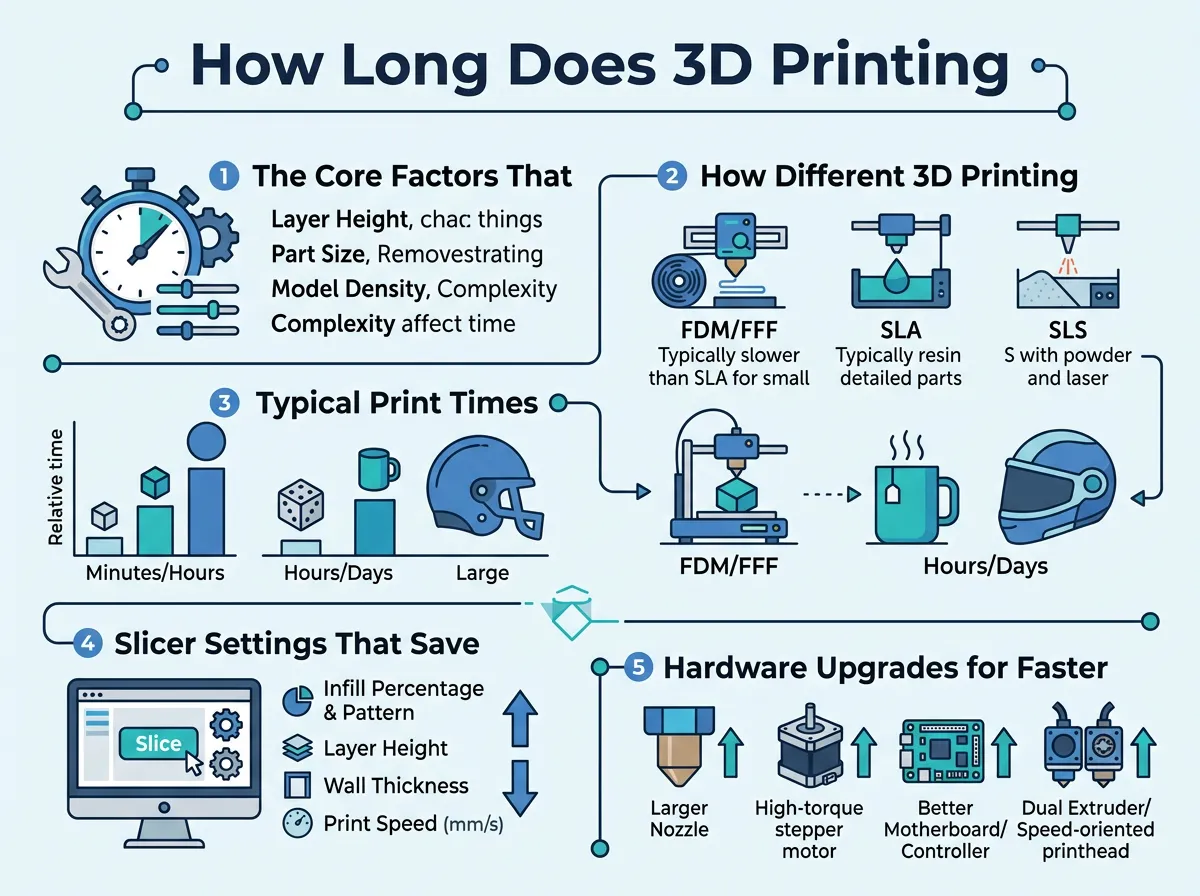
How Long Does 3D Printing Take? — key points at a glance
FDM (Fused Deposition Modeling)
FDM printers are the most common type for hobbyists. They melt plastic filament and draw shapes on a build plate. Because the nozzle must physically draw every line, FDM speed is limited by how fast the motor can move. If you are printing a single model, FDM is relatively quick. However, if you place ten models on the build plate, the print time will multiply by ten.
SLA (Stereolithography)
SLA printers use liquid resin and a UV light source to cure the liquid into solid plastic. These machines work differently than FDM. They cure an entire layer at the exact same time. It does not matter if you are printing one small ring or ten rings. The time remains exactly the same because the light cures the whole layer at once. To learn more about how industrial users plan their time budgets for these technologies, you can read about how long 3D printing takes on TWI Global’s technical knowledge site.
SLS (Selective Laser Sintering)
SLS printers use a powerful laser to fuse nylon powder into solid objects. These are professional, industrial machines. They are highly efficient because they do not require support structures. You can stack objects on top of each other in the powder bed. While the actual printing process can take up to twenty-four hours, you can produce hundreds of parts at once. For businesses, this makes SLS incredibly fast in terms of parts per hour.
Typical Print Times for Common Objects
To give you a better idea of what to expect, let us look at some practical examples of common prints.
Small Trinkets and Miniatures
If you want to print a small tabletop gaming miniature or a simple keychain, you are in luck. These items are small and use very little material. On a standard FDM printer, a simple chess piece or a tiny toy cat will take between thirty minutes and two hours. If you use a resin printer, you can print a whole army of six miniatures in about three hours.
Medium Objects like Phone Cases
A custom smartphone case or a simple desk organizer is a medium-sized project. These items have a larger surface area but are usually not very tall. A standard phone case takes about two to four hours on an FDM printer. A small flower pot might take four to eight hours, depending on how thick you make the walls.
Large or Functional Prototypes
This is where patience becomes a virtue. If you want to print a large mechanical prototype, a drawer organizer, or a cosplay mask, prepare to wait. These objects often require support structures to hold up overhanging parts. This extra plastic adds hours to the print. You can expect these larger items to take anywhere from twelve hours to several days to complete.
Slicer Settings That Save You Time
You do not always have to buy new parts to speed up your prints. Your slicing software has secret settings that can cut your print times in half. For a deeper look into optimizing these exact settings, you can explore Raise3D’s detailed speed analysis for professional tips.
Wall Thickness and Shells
Walls are the outer layers of your print. Slicers call these “walls” or “shells.” It is tempting to add many walls to make a part strong. However, each extra wall requires the nozzle to make another pass around the perimeter. For most prints, two or three walls are plenty. Reducing your walls from five to three can save you hours on a large print.
Travel Speed and Acceleration
Travel speed is how fast your print head moves when it is not extruding plastic. Many stock profiles set this speed very low to prevent shaking. If you raise your travel speed, your print head will zip quickly between different sections of the model. This is especially helpful for models that have many separate parts or columns.
Adaptive Layer Heights
This is a brilliant software feature. It allows your printer to change the layer height dynamically. For vertical, flat walls, the printer uses thick layers to save time. When it reaches a highly detailed dome or a curve, it automatically switches to thin layers to keep things smooth. This gives you the best of both worlds: high speed and great detail.
Hardware Upgrades for Faster 3D Printing
If you have tweaked your slicer and still want more speed, it might be time to upgrade your hardware.
Upgrading to a Larger Nozzle
Most 3D printers come standard with a 0.4mm nozzle. This is great for detail, but it limits how much plastic can flow out. If you swap it for a 0.6mm or 0.8mm nozzle, you can print much thicker lines. This reduces the number of passes your printer has to make. You can cut your print time by 30% to 50% simply by changing this cheap brass nozzle.
High-Flow Extruders and Hotends
Your printer can only move as fast as it can melt plastic. If you try to print too quickly with a weak heater, your nozzle will jam. Upgrading to a high-flow hotend allows your printer to melt plastic much faster. This lets you increase your print speed from a standard 50mm/s to well over 150mm/s.
Utilizing Klipper Firmware
Klipper is a modern printer firmware that uses a secondary computer, like a Raspberry Pi, to do all the heavy math. This relieves pressure on your printer’s mainboard. Klipper uses advanced algorithms to prevent shaking at high speeds. This allows you to safely double your printing speed without losing any detail.
Conclusion
In the end, there is no single answer to the question of print speed. 3D printing is a balance between time, detail, and strength. If you want a beautifully detailed model, you must be prepared to wait. However, if you understand how size, layer height, and infill work, you can easily optimize your settings to get the job done faster. Do not be afraid to experiment with your slicer, upgrade your nozzle, and push your machine to its limits. Happy printing!
Frequently Asked Questions
How long does it take to 3D print a miniature?
A small gaming miniature usually takes between one and three hours to print. The exact time depends on the level of detail and the layer height you choose. Using a resin printer can allow you to print several miniatures in the same amount of time.
Why does my 3D printer take longer than the slicer estimate?
Slicers calculate print times based on ideal speeds and do not always account for the physical slowdowns of your printer. Factors like acceleration, deceleration, and hotend heating times can add extra minutes to the final print. Updating your slicer’s machine limits to match your printer’s actual firmware settings will make the estimates much more accurate.
Does printing faster ruin the quality of the model?
It can if your printer is not set up for high speeds. Fast printing can lead to issues like ghosting, poor layer adhesion, and messy details. However, if you have a sturdy frame, a high-flow hotend, and advanced firmware, you can print fast while maintaining excellent quality.
How long does a 3D print of a cosplay helmet take?
A full-sized cosplay helmet is a massive project that usually takes between forty-eight and ninety-six hours of continuous printing. You can reduce this time by using a larger nozzle or splitting the helmet into smaller sections. Painting and sanding will also add to your total project time.
Is resin 3D printing faster than filament printing?
Resin printing is faster when you are printing multiple items or highly detailed models because it cures entire layers at once. For a single, simple object, a filament printer is often quicker to set up and complete. The post-processing steps for resin, like washing and curing, also add to the overall time.
What is the fastest 3D printer on the market?
Modern high-speed consumer printers, like the Bambu Lab series or upgraded Voron builds, can print at speeds up to 500mm/s. These machines use lightweight parts and advanced firmware to print up to five times faster than traditional desktop printers. They can finish in hours what used to take an entire day.
