


Learning how to create 3D models is an exciting journey that begins with choosing the right software and understanding basic geometric shapes. By mastering core techniques like box modeling and digital sculpting, you can bring any digital concept to life. With consistent practice and a simple step-by-step workflow, anyone can transition from a complete beginner to a skilled 3D artist.
Have you ever looked at a cool character in a video game and wondered how it was made? Or maybe you saw a beautiful architectural render online and thought, “I want to design that.” Learning how to create 3D models can feel like acquiring a superpower. You can build anything you imagine. You can design a tiny screw, a custom toy, or an entire digital fantasy world.
But where do you start? The world of 3D can look scary at first. There are so many strange terms like vertices, textures, and rendering. Do not worry. This guide will break down the entire process into simple, bite-sized steps. We will cover the best software, core techniques, and a simple workflow you can use today.
By the end of this article, you will understand the basic path of a 3D artist. You will know which buttons to press first and how to turn a blank screen into a beautiful three-dimensional object. Let us dive in!
Key Takeaways
- Select the right software: Choose Blender for a free, all-in-one tool, or Tinkercad for absolute beginners.
- Master basic shapes: Every complex 3D object starts as a simple cube, sphere, or cylinder.
- Learn fundamental techniques: Focus on box modeling and digital sculpting to build your skills.
- Keep your geometry clean: Good edge flow prevents weird textures and makes animation much easier.
- Practice texturing and lighting: Adding realistic colors and shadows brings your flat grey models to life.
- Start with small projects: Build simple objects like a coffee mug before trying to model a complex character.
Quick Answers to Common Questions
Can I learn 3D modeling for free?
Yes, you can easily learn 3D modeling for free using open-source software like Blender and watching high-quality tutorials on YouTube.
Do I need a drawing tablet for 3D modeling?
No, a standard computer mouse is perfectly fine for polygonal modeling, though a drawing tablet is highly recommended for digital sculpting.
What is the easiest 3D modeling software for absolute beginners?
Tinkercad is the easiest software for absolute beginners because it uses simple drag-and-drop shapes inside your web browser.
Can I use my 3D models for 3D printing?
Yes, you can export your completed 3D designs as STL or OBJ files and send them directly to a 3D printer slicing software.
How long does it take to make a simple 3D model?
A beginner can design a simple object like a low-poly mug or a table in under thirty minutes once they learn the basic interface of their software.
📑 Table of Contents
Choosing Your 3D Modeling Software
Before you can make your first digital object, you need the right tool. There are many software options available. Some are free, while others are very expensive. Some are easy for kids, and others are used by Hollywood film studios. Let us look at the best options for your goals.
Blender: The Best All-Rounder (Free)
If you want to know how to create 3D models without spending any money, Blender is your answer. Blender is completely free and open-source. It has a massive community of users. This means you can find thousands of free tutorials online. With Blender, you can model, sculpt, paint, animate, and render. It is a fantastic tool that grows with you as you learn.
Tinkercad: The Perfect Starting Point
Are you an absolute beginner? Do you want to try 3D design without feeling overwhelmed? Tinkercad is a web-based app made by Autodesk. It is free and runs right inside your web browser. Instead of drawing complex shapes, you drag and drop simple shapes like blocks and cones. You glue them together or cut holes in them. It is highly recommended for kids and teachers.
ZBrush: The King of Digital Sculpting
If you love clay modeling, you will love ZBrush. This software is the industry standard for organic shapes. Artists use it to design monsters, characters, and realistic creatures. It operates like digital clay. You use a digital pen to pull, push, and smooth the surface of your model. It has a steep learning curve, but it is incredibly powerful.
Understanding the Anatomy of a 3D Model
To learn how to create 3D models, you must understand what they are made of. When you look at a 3D object on your screen, you are looking at a digital mesh. This mesh is made up of three basic elements. Let us look at each one.
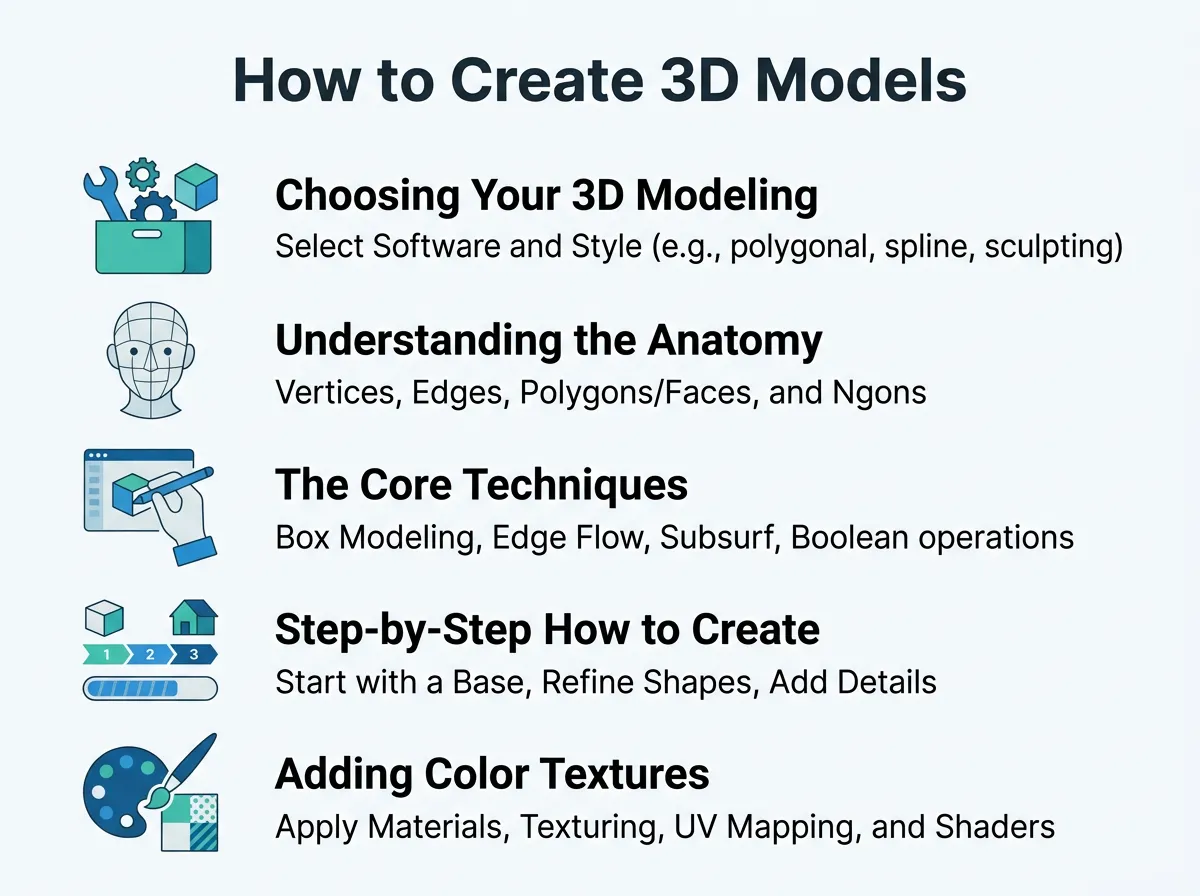
How to Create 3D Models? — key points at a glance
1. Vertices
A vertex is a single point in 3D space. It is the smallest building block of any model. If you connect two vertices, you get a line. When you move a single vertex, you change the shape of your object.
2. Edges
An edge is the straight line that connects two vertices. Edges help define the sharp corners and smooth curves of your model. You can grab an edge and stretch it to make your model longer or wider.
3. Faces
A face is the flat surface filled in between three or more connected edges. Most modern 3D models use four-sided faces, often called “quads.” Faces are what you actually see when you render your final image. They catch the light and hold the colors.
The Core Techniques of 3D Modeling
There are different ways to shape your digital objects. Most artists use a mix of these techniques depending on what they are making. Let us explore the three most common methods.
Box Modeling
This is the most traditional method. You start with a simple geometric shape, like a cube. Then, you add more detail slowly. You might split the cube in half, extrude new parts, and pull out faces. Think of it like carving a wooden toy from a block of wood. This technique is great for building houses, furniture, and hard-surface objects.
Digital Sculpting
This technique feels like working with real clay. You start with a digital sphere. Using a tablet and pen, you sculpt details onto the surface. You can carve deep wrinkles, pull out long horns, or smooth out cheeks. This is the best method for organic things like humans, animals, and alien creatures.
Procedural Modeling
This is a more advanced method. Instead of hand-carving your shapes, you write rules and instructions. The computer then builds the model for you. This is highly useful for creating large cities, vast forests, or complex patterns. If you change one rule, the whole model updates automatically.
Step-by-Step: How to Create Your First 3D Model
Now that you know the tools and techniques, let us look at a simple workflow. This is the exact process professional artists use to build their models. You can follow these steps to make your very first object, like a simple coffee mug.
Step 1: Gather Reference Images
Never try to model purely from memory. Even simple objects have details we easily forget. Search online for photos of the object you want to build. Look at it from the front, side, and top. Save these images to your computer. You can even import them directly into your 3D software to use as a guide.
Step 2: Block Out the Basic Shapes
Do not start with the details. If you are making a mug, start with a simple cylinder. Scale it to the right height. Hollow out the top face. This is called the “blocking” phase. It helps you get the overall proportions right before you spend time on the small stuff.
Step 3: Add the Details
Once your basic cylinder looks good, it is time to add the handle. Select a few faces on the side of your cylinder. Extrude them outwards to build the handle shape. Merge the end of the handle back into the main body of the mug. Use bevel tools to round off any sharp edges so the mug looks realistic.
Step 4: Clean Up Your Geometry
Ensure your model does not have any stray vertices or overlapping faces. Delete any hidden geometry inside the model that no one will see. This keeps your file size small and makes the model run smoothly on your computer.
Adding Color, Textures, and Light
A grey model can look a bit boring. To make it pop, you need to apply some artistic finishes. This process transforms your grey shapes into realistic objects.
Materials and Textures
A material tells the computer how your object interacts with light. Is it shiny like glass? Is it dull like cardboard? You can also paint textures onto your model. This lets you add wood grain, metal rust, or skin freckles. You can use digital brushes to paint directly onto your 3D mesh.
Lighting Your Scene
Just like in real-world photography, lighting is everything. You can add digital lamps to your scene. A bright sun lamp will create harsh shadows. A soft area light will create gentle, warm shadows. Good lighting can turn a mediocre model into a masterpiece.
Conclusion
Learning how to create 3D models is a journey of patience and practice. Do not expect to build a Hollywood-ready character on your first day. Start small. Model a coffee cup, a book, or a simple sword. Celebrate your small victories. Over time, your hands will get faster, and your eyes will spot details more easily. Grab a free copy of Blender, open up a tutorial, and start creating today!
Frequently Asked Questions
What is the difference between low-poly and high-poly models?
Low-poly models use a small number of polygons, making them perfect for real-time video games because they load quickly. High-poly models use millions of polygons to capture extreme detail, which is ideal for animated movies and close-up renders.
Is coding required to create 3D models?
No, you do not need any coding skills to create 3D models. Most artists use visual tools, buttons, and hotkeys to shape their objects, though coding can be used for advanced automated tasks.
What computer specs do I need for 3D modeling?
While you can start on a basic laptop, a computer with a dedicated graphics card, at least 16GB of RAM, and a modern multi-core processor will make rendering much faster and smoother.
What is UV unwrapping?
UV unwrapping is the process of flattening a 3D model into a 2D plane. This flat map allows you to paint and apply 2D image textures onto the 3D surface accurately without stretching.
Can I make money by creating 3D models?
Yes, you can earn money by selling your assets on online marketplaces, working as a freelance artist, or finding full-time jobs in the gaming, film, and architectural visualization industries.
Should I learn Blender or Maya first?
If you are a hobbyist or indie developer, Blender is the best choice because it is completely free and has a massive community. If you want to work for a major movie or gaming studio, learning Maya is beneficial as it is the industry standard.
